Overview of Services
Services is the enhanced booking and scheduling tool designed specifically for service-based businesses. Services provide you with many feature upgrades including:
Better Booking Experience
Quickly create and manage new services.
Cleaner, more intuitive booking pages.
Book multiple services at once directly from the in-app appointment modal.
More Payment Options
Accept payments via Stripe, Square, Razorpay, Authorize.net, and NMI.
Save cards on file for future bookings.
Collect payments directly in the appointment modal.
Flexible Services Management
Control public or private service visibility.
Create service variations (different durations, prices).
Add add-ons and processing times to bookings.
Manage resources like rooms and equipment.
Click here for more information on Services Management
Advanced Staff Configurations
Offer staff-specific pricing.
Configure granular staff availability.
Auto-assign appointments based on availability or price.
Click here for more information on Staff Configurations
Easy Customization
Share booking links for services, staff, or categories.
Brand your booking page with advanced customization options.
Use global settings for quick updates.
Keep customers informed with customizable notifications.
Click here for more information on Services Customization
Key Benefits of Services
Services help you speed through setup, reduce booking errors, and boost conversions while keeping you in control.
Boost Revenue: Encourage customers to book multiple services in a single checkout and add paid add‑ons
Enhance Customer Experience: Provide flexible booking options and optimized booking pages that reduce friction
Streamline Scheduling: Use advanced booking management tools tailored to your business exact needs
Save Time and Effort: Simplify setup and operations with unified booking flows, easy payment collection, and built‑in automations
How to Enable Services for a Single Account?
You can enable Services for accounts directly from Account Settings. Follow these steps to activate Services in a single account!
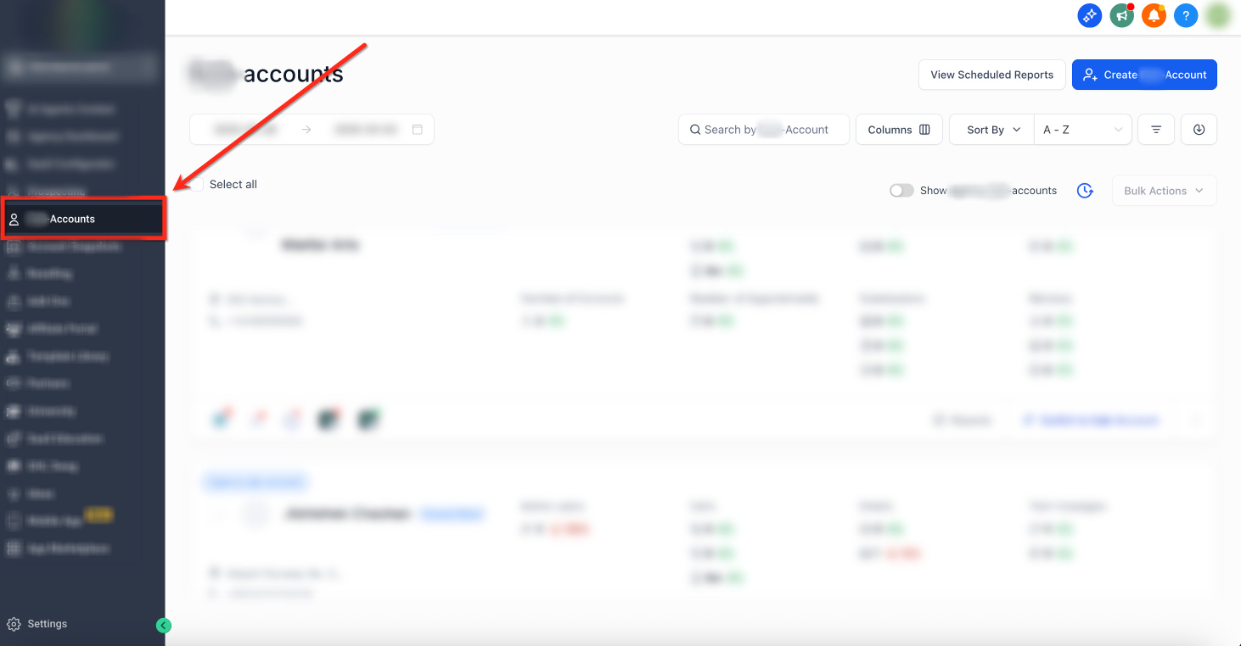
Step 1: Navigate to Accounts
- From the Account dashboard, select the Accounts tab on the left-side navigation bar
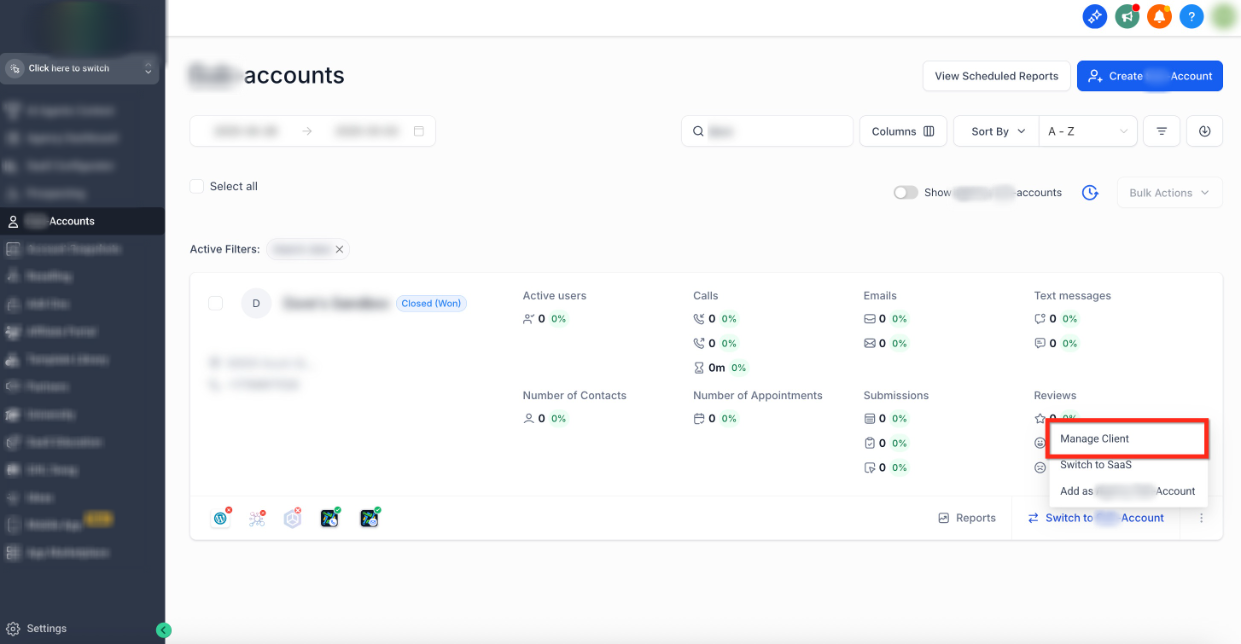
Step 2: Go to Manage Client
- Use the search bar or scroll to locate the account where you would like to active Services
- Click the Three Dots (⋮) icon in the bottom right of the account panel
- Select the Manage Client Option
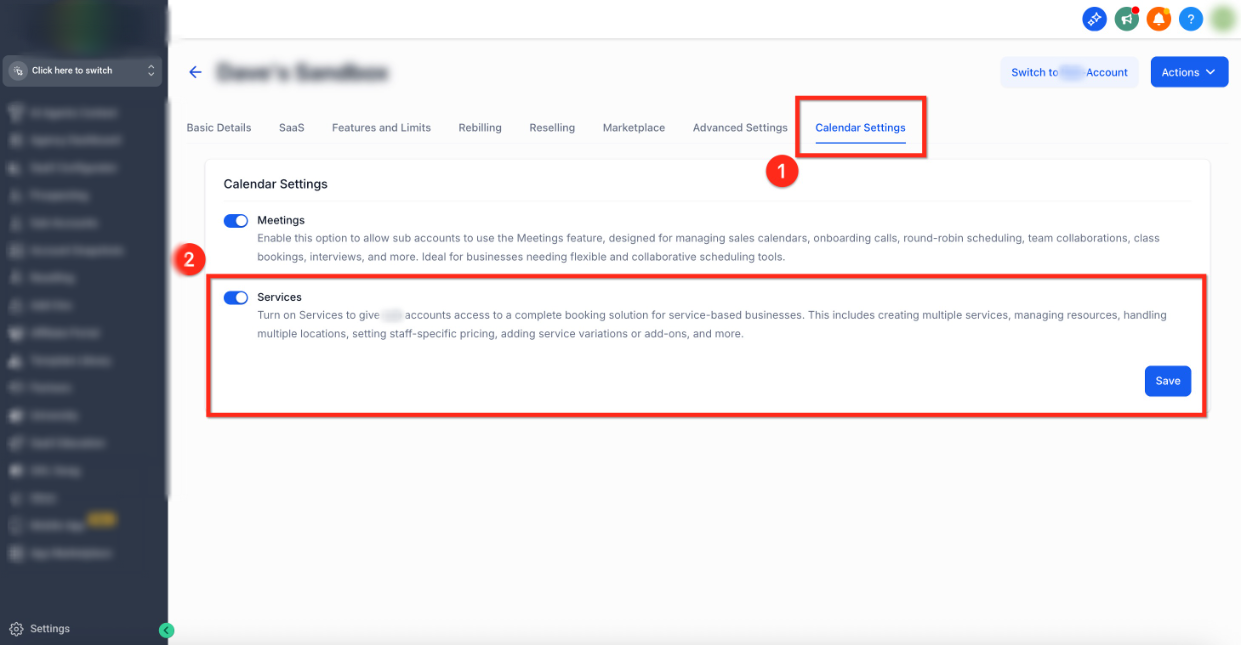
Step 3: Turn on Services (Single Account)
- Select Calendar Settings from the top navigation bar
- Use the toggle to Turn On Services
- Click the blue Save button to save your changes
How to Enable Services for Multiple Accounts?
You can enable Services for accounts directly from Account Settings. Follow these steps to activate Services for multiple accounts at once!
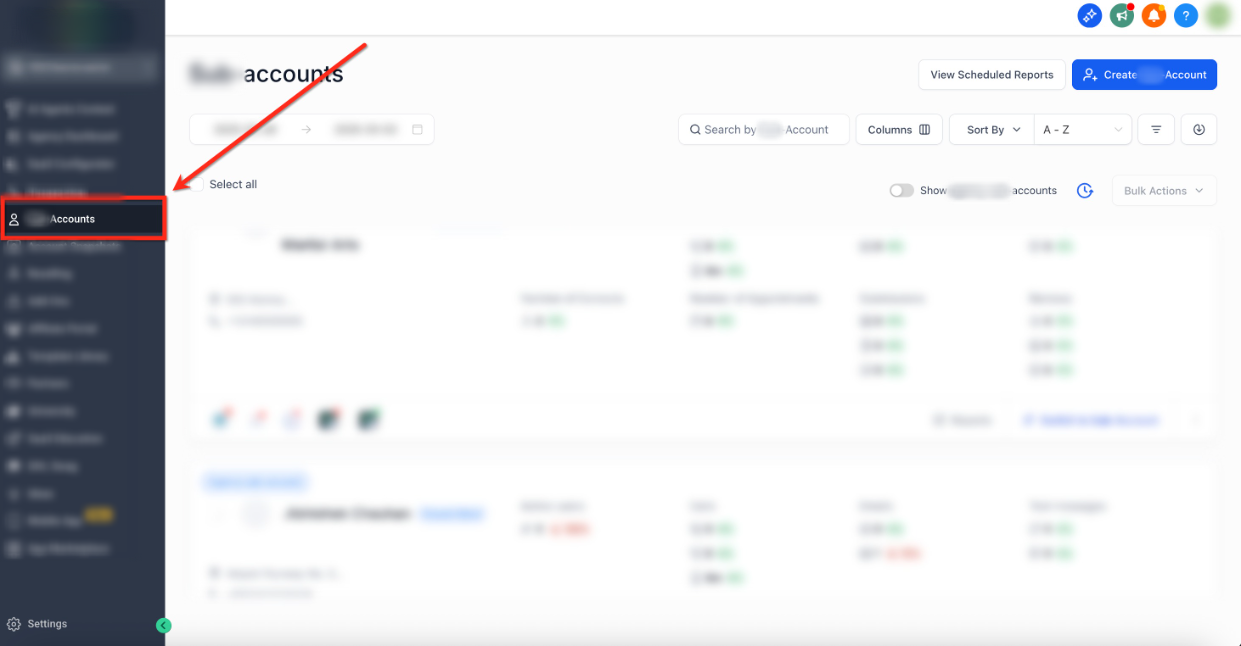
Step 1: Navigate to Accounts
- From the Account dashboard, select the Accounts tab on the left-side navigation bar
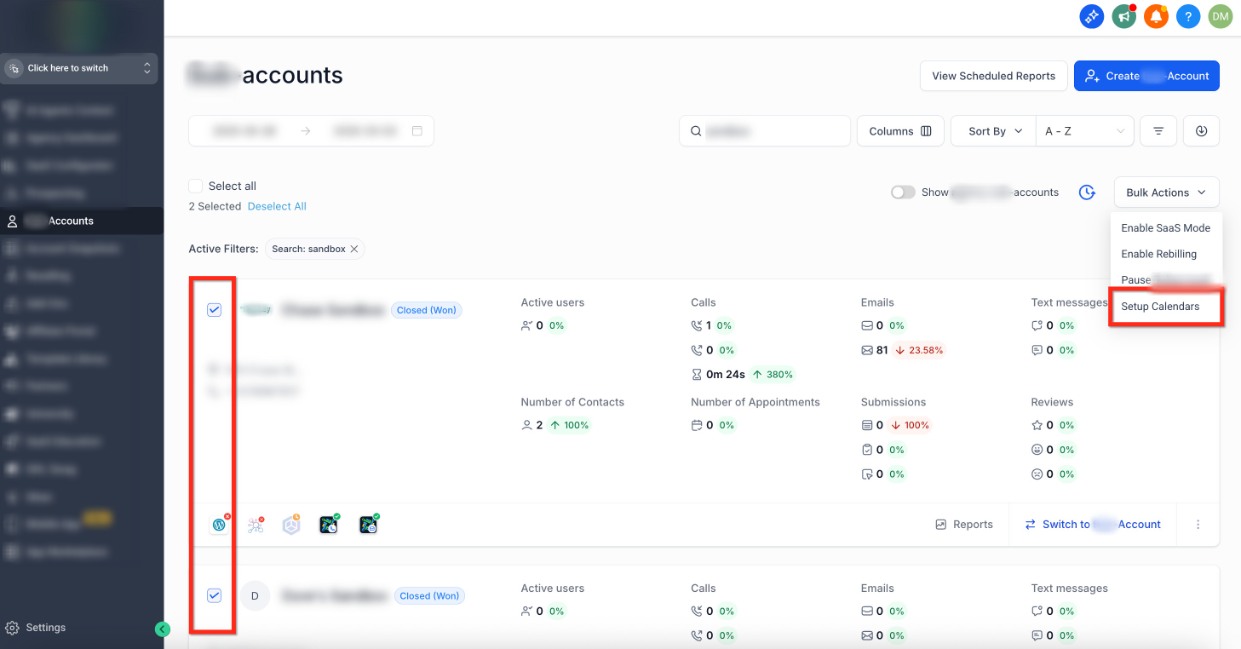
Step 2: Open Setup Calendars
- Select the accounts where you would like to active Services using the checkboxes
- Once accounts are selected, click Bulk Actions in the upper-right corner
- From the drop down menu, pick Setup Calendars
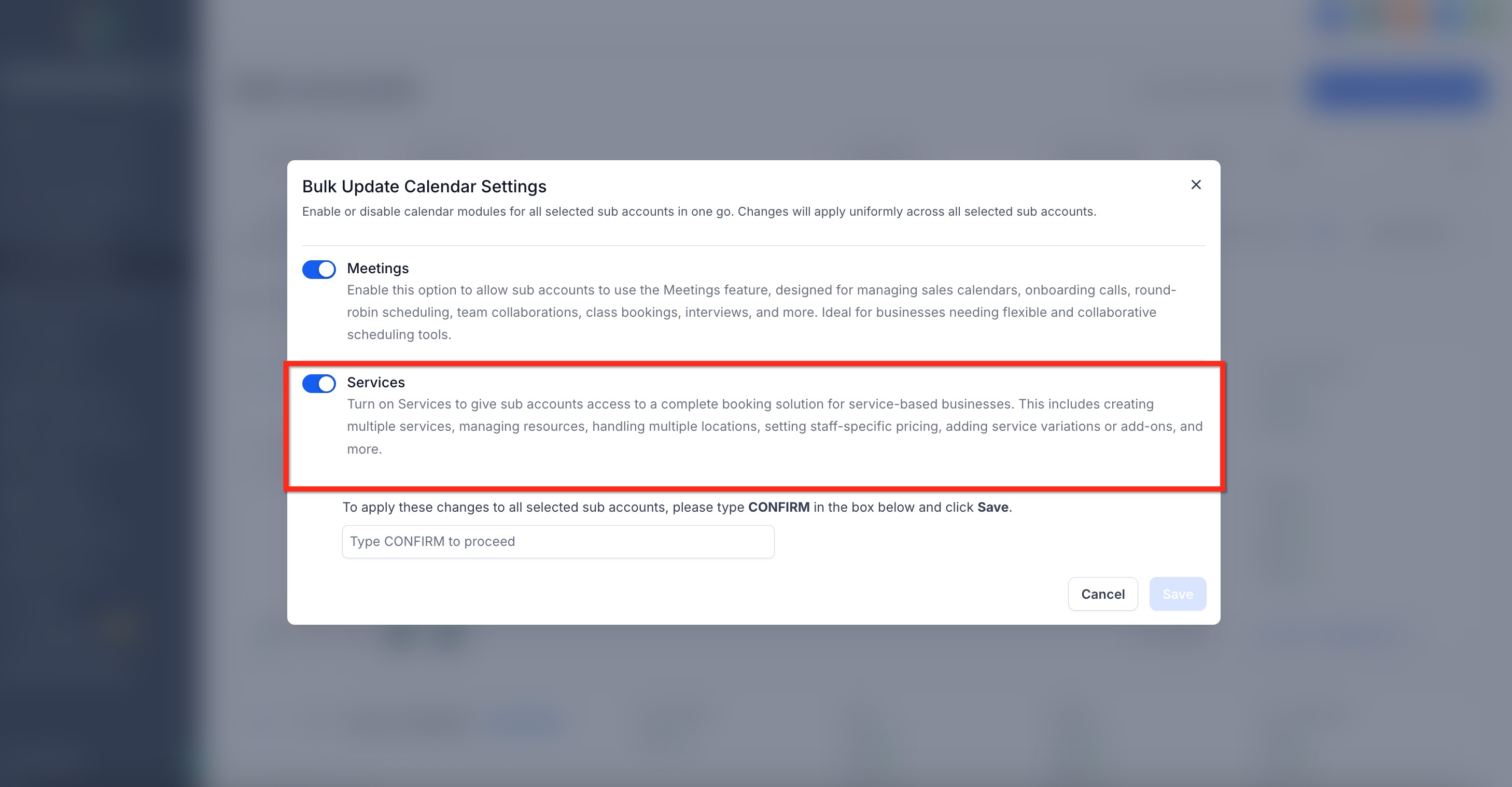
Step 3: Turn on Services (Multiple Accounts)
- Use the toggle to Turn On Services
- Type CONFIRM then click the blue Save button to save your changes
Upcoming Features for Services
We’re always working to make Services better for you. Here’s an early look at what’s coming soon:
Group Bookings – Book multiple appointments for the same time slot.
Reporting & Insights – Get detailed reports on bookings, services, and revenue.
- Opportunities Integration – Book and manage service appointments via the Opportunities tab.
- Conversation AI & Voice AI – Allow AI bots to book appointments on your behalf.
- Custom Values in Email Builder – Use service-based custom values in your email templates.
[Now Live] Snapshots – Create snapshots and import your setup into different accounts.
[Now Live] Mobile App Support – Create and view service bookings directly from the mobile app.
[Now Live] Custom Forms at Service Level – Add custom forms to individual services for more flexibility.
[Now Live] Edit Unpaid Appointments – Make edits to unpaid appointments (paid appointments editing will be added in a future update).
[Now Live] Processing Fees – Apply processing fees to each transaction.
[Now Live] Gift Cards for Services – Enable customers to purchase and redeem gift cards.
[Now Live] Taxes for Services – Configure and apply tax settings for services.
Frequently Asked Questions
Q: Will enabling Services disrupt my existing calendars or workflows?
No. When you enable Services, the platform automatically copies your existing service calendars and creates equivalent Services. Your current calendars and any workflows tied to them continue to work exactly as they do today. You can run Meetings (Existing Calendars) and Services side by side or enable only the one that fits best. This ensures that the transition is smooth and without disruptions.
Q: Do I have to connect payments before enabling Services?
No, but you must connect a provider before collecting payments on the booking page.
Q: Can I enable Services for only some accounts?
Yes. Since the activation of services is done on a per account basis, you can roll it out selectively. Enabling Services in specific accounts will not affect the other (non-selected) accounts.
Was this article helpful?
That’s Great!
Thank you for your feedback
Sorry! We couldn't be helpful
Thank you for your feedback
Feedback sent
We appreciate your effort and will try to fix the article